Showing posts with label Linux. Show all posts

Friday, November 30, 2007

Fedora 8 vs. openSUSE 10.3 vs. Ubuntu 7.10

Linux live-CD's are a great nondestructive way of auditioning Linux. Simply pop a live-CD into your CD drive, reboot, and then in a couple minutes you are running Linux. No hard drive partitioning, no lengthy installation process, no fuss. Linux live-CD's are also a quick and easy way to try many different Linux distributions. The latest Fedora, openSUSE, and Ubuntu live-CDs were tested for compatibility with the baudline signal analyzer.

The following Gnome based Linux distributions were all released during October and November 2007 with live-CD versions:
Since they were released around the same time, all three use very similar versions of the Linux kernel, X-Windows, Gnome 2.20, and other common libraries. So it seemed like a great opportunity to compare them and see how well they worked with baudline. In theory the 3 different distributions all should of behaved in about the same way but they didn't. Another fine point is that all three Linux live-CD's advertised Xgl compiz 3D window effects but unfortunately none of the distributions supported this on our two test systems with the default video card drivers. For a review of a 3D compiz desktop see this Kororaa Linux Xgl LiveCD review.

Test Systems
We used two different 4-year old machines for the tests just to make sure that some unusual behavior wasn't being caused by an odd poorly supported piece of hardware. Here are the machine specs:
  • Intel Pentium IV 2.0 GHz
  • VIA P4X266 chipset
  • 512 MB RAM DDR266
  • GeForce4 MX 440 AGP 4X video card
  • Creative Labs Sound Blaster 16 PCI ES1371
  • integrated VIA VT8235 audio chipset
and
  • AMD Athlon XP 2600+ 2.1 GHz
  • nVidia nForce2 chipset
  • 1.5 GB RAM DDR333
  • SiS 300 PCI video card
  • Labtec-704 USB microphone
We performed a simple rendering benchmark that consisted of running baudline with the -reset flag, then recording a full buffers worth of data, pausing, adjusting the Color Aperture window as a remap tweak, and then measuring the FFT transforms/second value in the Stats window. This simple repeatable test caused baudline to re-render it's spectrogram which is a CPU intensive operation that involves the baudline, X-Server, and kernel code.

Now let the testing begin!

Fedora 8
RedHat's latest community release uses the Linux 2.6.23.1-42.fc8 kernel and the Xorg 1.3.0.0 server. Video defaulted to 24 bpp graphics and all the audio devices were found and enabled. Here is a screenshot of baudline running on Fedora 8:


The main font is wrong, it is bold and mono spaced, but it is readable. The incorrect font caused some of the baudline windows to have spacing and layout issues but this is purely cosmetic. The baudline spectrogram rendering test resulted in 4320 FFTs/second on the Intel P4 CPU and 8000 FFTs/second on the AMD Athlon CPU.


openSUSE 10.3
Novell's latest community release uses the Linux 2.6.22.5-31-default kernel and the Xorg 7.2 server. Video defaulted to 16 bpp graphics and none of the audio devices were found or enabled. Here is a screenshot of baudline running on openSUSE 10.3:
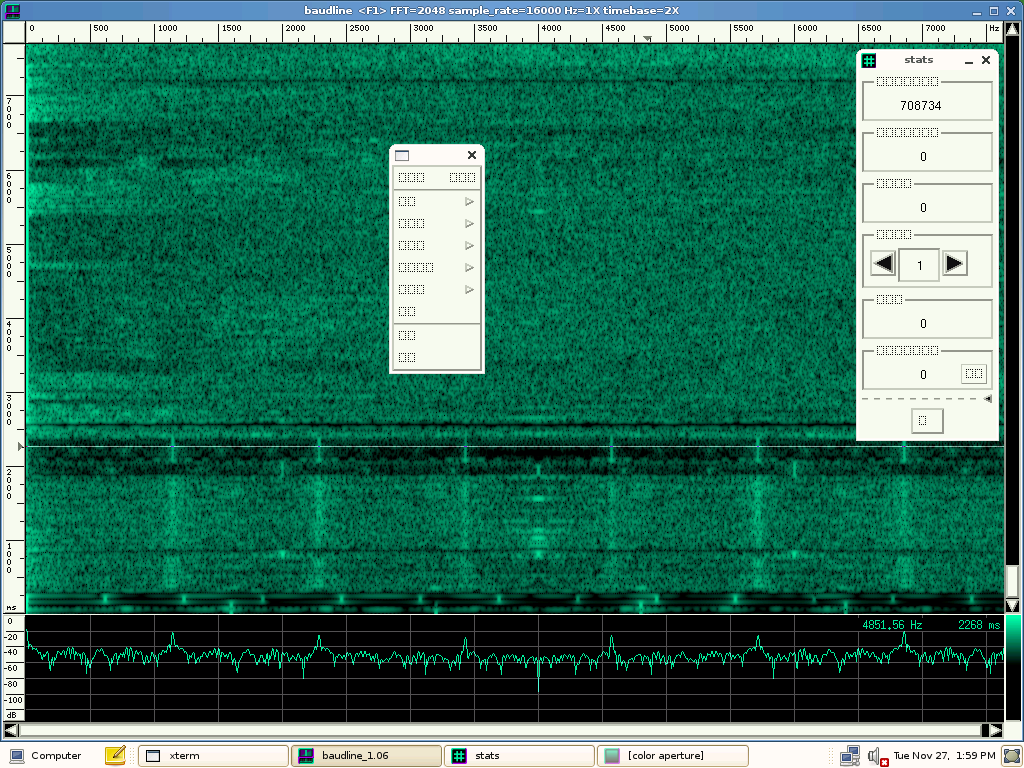

The main font consists of bizarre symbols and is completely unreadable and unusable. The baudline spectrogram rendering test resulted in 1200 FFTs/second on the Intel P4 CPU and 8400 FFTs/second on the AMD Athlon CPU. Due to less memory bandwidth usage, 16 bpp graphics are usually a lot faster than 24 bpp graphics but that doesn't seem to be the case here.


Ubuntu 7.10
Canonical's latest community release the "Gutsy Gibbon" uses the Linux kernel 2.6.22-14-generic kernel and the Xorg 1.3.0.0 server. Video defaulted to 24 bpp graphics and all the audio devices were found and enabled. Here is a screenshot of baudline running on Ubuntu 7.10:


Finally a distribution that uses the correct Helvetica font! The baudline spectrogram rendering test resulted in 5400 FFTs/second on the Intel P4 CPU and 8800 FFTs/second on the AMD Athlon CPU.


Verdict
We at SigBlips recommend using the baudline signal analyzer with the Ubuntu 7.10 live-CD. It was the only live-CD that used the correct Helvetica font, the test audio devices all worked, and it had the fastest baudline spectrogram rendering. We don't understand how baudline on Ubuntu 7.10 could render 25% faster on the Intel P4 CPU and 4% faster on the AMD Athlon CPU than it could on the Fedora and openSUSE distros. We also don't understand how openSUSE rendering could be so slow on our Intel P4 test machine. Kernel and X-Server compiler optimizations cannot explain this huge performance rift. Some fundamental hardware configuration settings (bus modes?) had to be different.

The font and the audio device driver issues probably can be easily fixed after a full install but that wasn't the point of this live-CD battle showdown. We're not sure if the performance issues can be fixed without major re-configuration and compilation.

In any case, if you want to use baudline with a Linux live-CD then we recommend Ubuntu 7.10 "Gutsy Gibbon" since it worked the best and it also was the fastest. Not bad for a distro release that's named after a monkey! Now if the distros could only enable backing store and include the baudline helper apps. (:

Friday, March 17, 2006

Kororaa Linux Xgl LiveCD

We recently downloaded the Kororaa Project's Xgl Demo Live CD (Version 0.1) to test out the new Xgl and Compiz technologies. A LiveCD is a simple and painless way of auditioning Linux without the hassle of installation. The transparency, motion, and 3D effects looked extremely cool and we had to give it a try.

Our test machine was a 2.0 GHz Pentium 4, 512 MB RAM, GeForce4 MX 440 (64 MB) video card, Sound Blaster 16 PCI card, on-board VIA 8235 sound chip, and a Labtec 704 USB microphone. The Kororaa LiveCD booted up fine but the mouse and window responsiveness was horrifically slow. Something was definitely wrong and our 2 GHz machine seemed more like a 2 MHz machine. Restarting with the "kororaa noapic" boot options solved the problem. Our first reaction was "Wow, this is awesome!"

Next we fired up baudline, performed some testing, and the screenshots are below.

Opaque Transparency
With the Compiz window manager the Ctrl+Shift+wheel key/mouse sequence adjusts a window's transparency. Windows can be made partially opaque which can be used in a powerful way with baudline.


In the above image; the Tone Generator is creating a FM sine sweep and the aliasing makes for some interesting spectrogram patterns. The Waveform and Histogram windows are visible but since they are transparent they don't block the green spectrogram window. This is a very effective method of maximizing limited screen real estate.


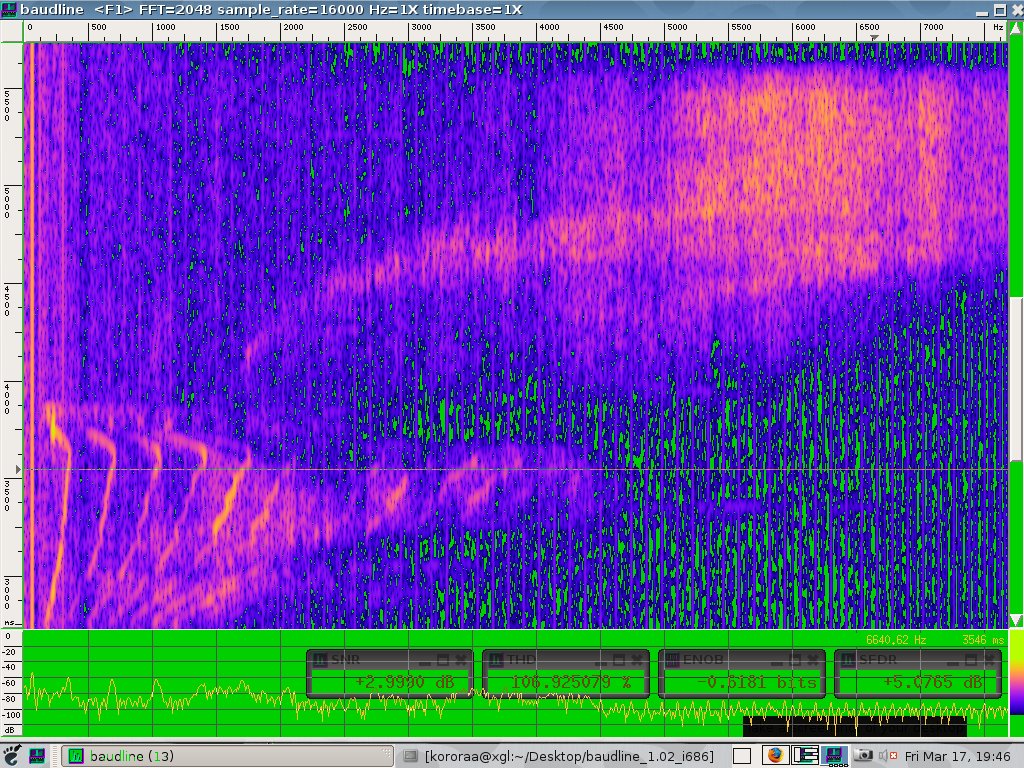
In the image above; the yellow-pink-blue spectrogram takes up the entire 1024x768 screen (except for the Gnome tool bar at the bottom). The SNR, THD, ENOB, and SFDR distortion measurement windows are transparent and they don't obscure the main display.

Spinning Cube
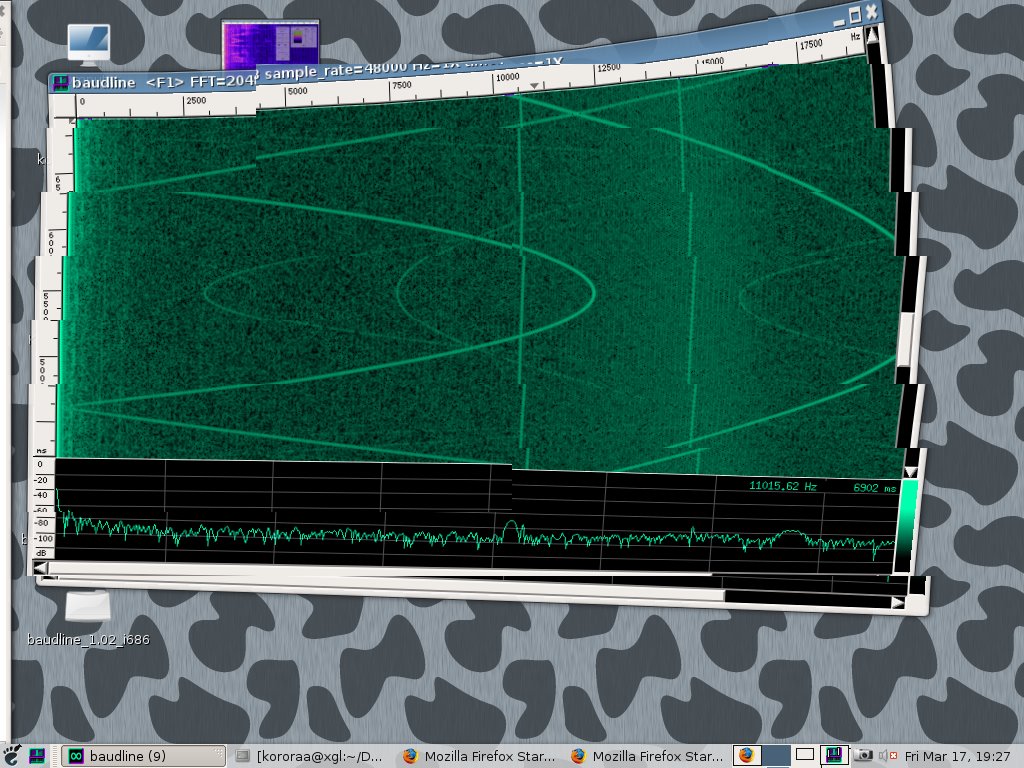
The virtual workspace is switched by Ctrl+Alt+mouse_button or Ctrl+Alt+arrows key combinations and the green and pink baudline spectrogram sessions spin around in an animated fashion. Makes me dizzy but it is groovy!


Jiggly Jello
Shake the title bar like a Polaroid picture and the window acts like jiggly jello. Unfortunately the image below doesn't do this feature justice. The motion is clean, smooth, and fluid. Nice physics implementation of the dynamics and the Q damping factor. This feature is a lot of fun to experiment with. (:


Observations
Baudline ran extremely well on Kororaa v0.1, better than on most LiveCDs, but there were some minor quirks:

  1. Minor screen and window sizing problems. The Metacity window manager was replaced by Compiz. Some code tuning for Compiz has been added to the baudline TODO list.
  2. Only 2 audio cards were mounted and our USB audio mic could not be used We think this is a kernel setup limitation.
  3. Xgl uses an incredible amount of CPU resources and the baudline scrolling speed is slow. The screen is double buffered for the 3D engine and this adds a large overhead. Our 2 GHz machine runs baudline with very high performance (3000 FFTs/seconds with a 100+ FPS scrolling speed). With the Kororaa CD the baudline performance was equivalent to a 200 MHz x86 with a low end graphics card running a traditional X-Server. All of that fancy 3D FX are expensive.
  4. The default (-reset) baudline performance on Kororaa was 150 FFTs/second and a 30 FPS rate. Most modern machines have no problem rendering a 125 FPS rate. By restarting baudline with the "-backingstore -xslip 1" command line parameters a 50% frame rate improvement to 45 FPS was possible. Xgl uses a double buffer scheme so the -backingstore flag is just taking advantage of what is already running.


Conclusion
Kororaa, Xgl, and Compiz are very cool. Compiz could be a little more feature rich such as adding window raising, lowering, stay on top, and stickies. Baudline could use some minor tweaks and tuning for Compiz. Our 2 GHz Pentium 4 and GeForce4 MX 440 machine is really pushing the bottom of the performance envelope while running baudline. Kororaa with a dual core 3.4 GHz P4 and a top of the line Nvidia card would be an amazing machine to run baudline on.

For the best Kororaa Xgl performance remember to startup baudline with the following command line:

baudline -backingstore -xslip 1